

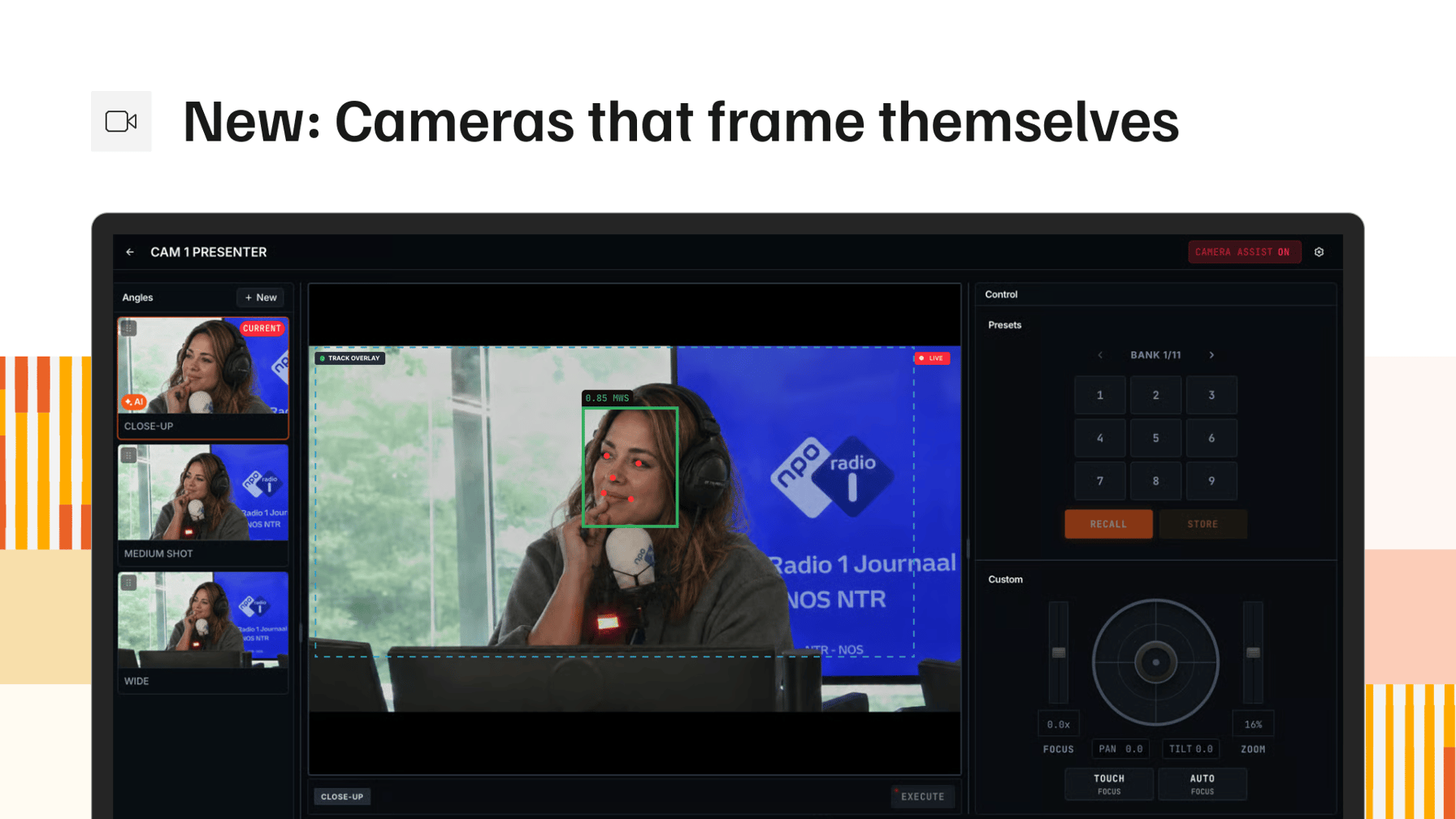
Camera angles have been part of VRA from the start. You stored a PTZ preset, pointed an audio trigger at it, and your switcher made the cut. What none of that did was look at the picture. A shot that was framed right in rehearsal drifts by the second hour, every guest sits differently from the one before, and somebody has to sit behind a joystick to put it back.
Today we are launching Camera Assist. It is an app you install on a machine in the studio, and it takes ownership of your PTZ cameras. You name the shot you want, close up through wide shot, and say how many people belong in it. Camera Assist works pan, tilt and zoom until the picture matches that shot, and then leaves it alone.
That is the part worth being precise about. This is not the head tracking built into most modern PTZ cameras, where the camera follows a person around the room and the picture moves with them. Camera Assist works to a broadcast framing standard instead. It holds a composition, the shot size you named with the right number of faces in it, the way an operator would set it.
It also does its correcting off air. While a camera is not on program, Camera Assist adjusts it in the background, so the shot is already right the moment that camera is taken and the picture your viewers see never crawls. A camera with nobody in frame is held back from program, so an empty chair never reaches air. Manual control is always there, and it locks itself the moment that camera hits program so nobody nudges a shot that is on screen.
Your shots stay yours. An angle is still one named position on one camera bound to a preset slot, now with its own thumbnail and its own framing settings. Open a camera from anywhere and its live picture comes up with the detected faces and the frame it is working to drawn on top. Framing works from measurements, not guesses: one button drives the camera through its full travel and writes back what it finds, and framing stays off until a camera has been through it. Pick your model from the PTZ camera database and the protocol, lens data and framing values fill themselves in.
Existing studios upgrade from the Cameras page. Install Camera Assist on the studio machine and your cameras move across on their own. Nothing changes in your current setup until you set a camera up for framing.
Landing in the same release, VRA Cloud opens on a new home page. The board is built around your role, so a producer, an operator and a manager each arrive at the sections that matter to them: studio health, which studio is on air, the schedule, the latest recordings and the outputs that are ready to play. Every tile can be reordered, resized or hidden, and the layout is kept per user.
New
- DashboardsVRA Cloud opens on a role-based welcome board with studio health, on air status, the schedule and the latest recordings, and every tile can be reordered, resized or hidden.
Improvements
- Audio ManagerTrigger group headers carry a member count, and member level bars use the same meter gradient as the rest of the platform with an outline marking on air.
- Audio ManagerTrigger faders now run down to minus infinity instead of stopping at -96.
- Audio ManagerSave and delete stay in reach at the bottom of an audio trigger while you scroll.
- Audio ManagerThe priority badge is hidden on triggers that sit at the default priority, so the mixer and the list only flag the exceptions.
- SwitcherThe DSK and macro rows read as keycaps on the bus, in line with the rest of the switcher.
- Media HubThe media selector dialog is larger and loads a page size that fits the window.
- Media HubEmpty states in the Media Hub and the bin match the rest of the platform.
Fixes
- Output PlayerDates and times in graphics now follow the station locale and the station time zone.
- Media HubRestored scrolling in the media selector dialog.
- PlayoutThumbnails on the playout index refresh instead of holding the first frame they loaded.